I bought a new Tesla Model Y and have driven it over 50,000 miles. Everything below is from real experience. You’ll find buying costs, hidden features, car camping, accessories worth buying, and much more.
You’ll find lots of useful insight for both buying a Tesla, and for current owners. Here’s a list to jump around this guide.
- Buying a Tesla
- Tesla Tips, Tricks & Hidden Features
- Driving a Tesla
- Tesla Camping
- Accessories & Gear
- Charging
- Maintenance
- Tesla Problems
Tesla Guides for Owners in 2026
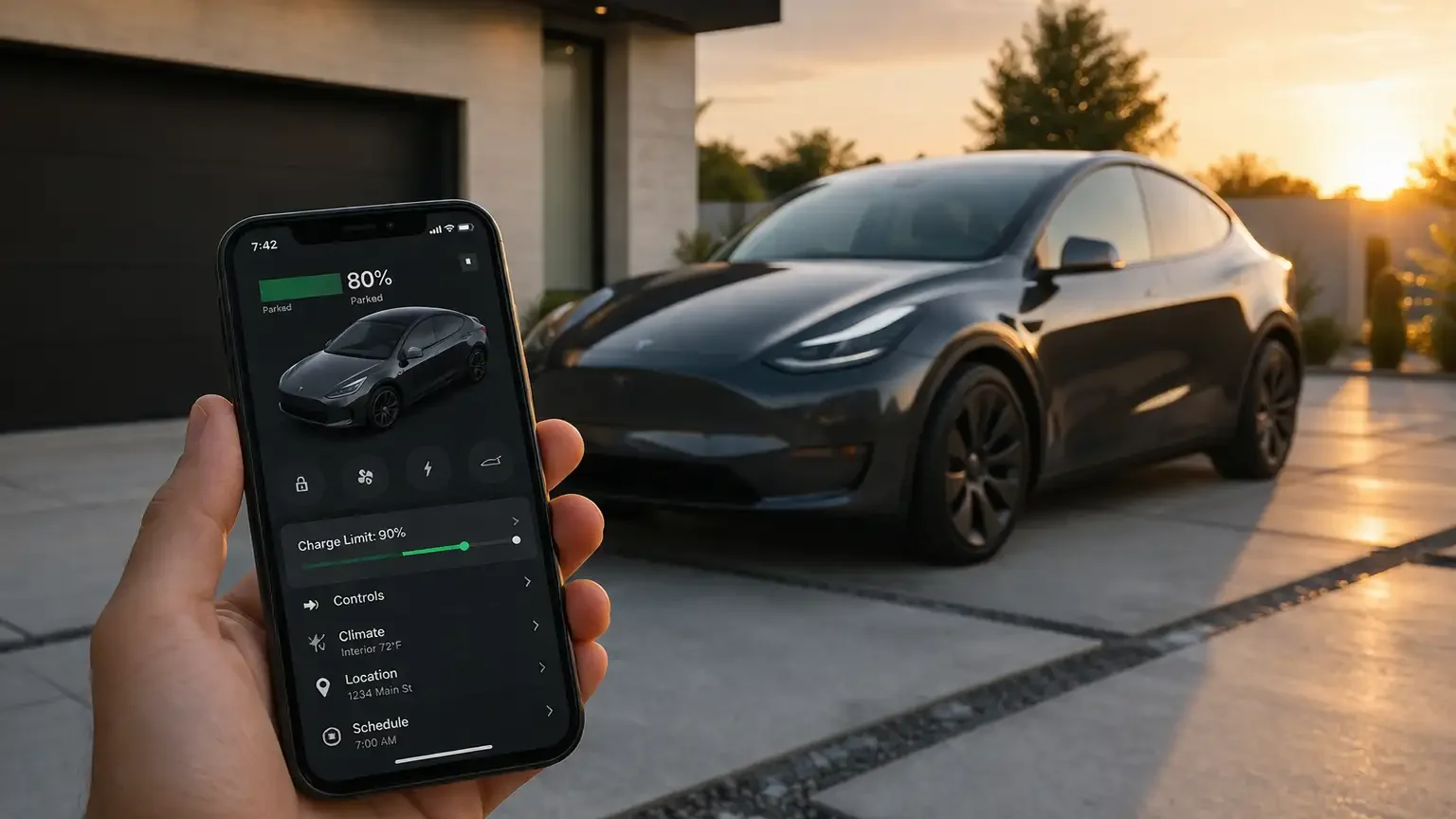
Buying a Tesla
Let’s look at cost, pricing history, real ownership numbers, and what to know before you buy. To start, here’s the price history…
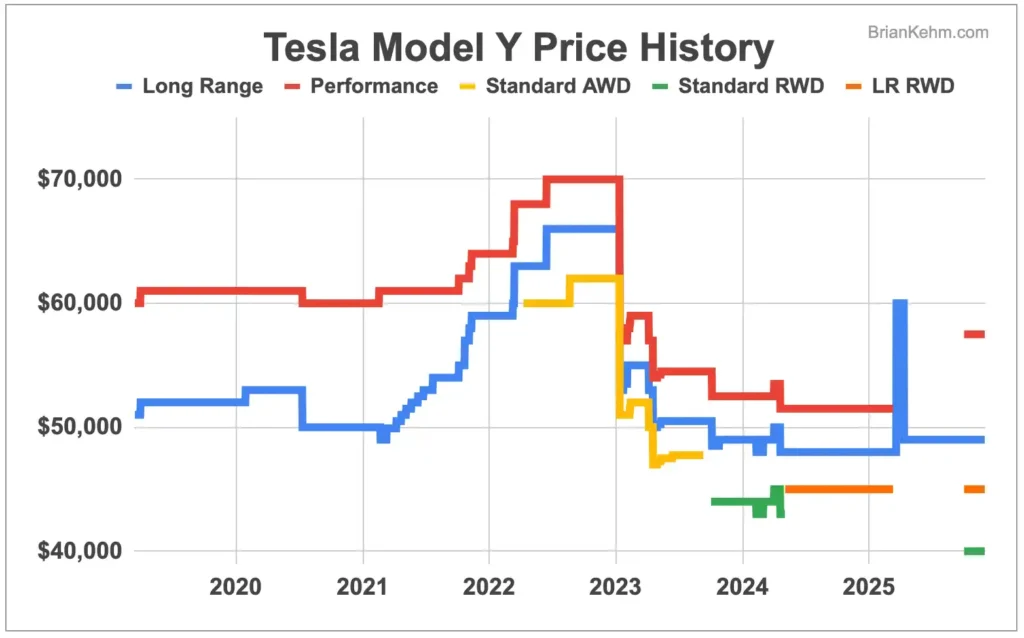
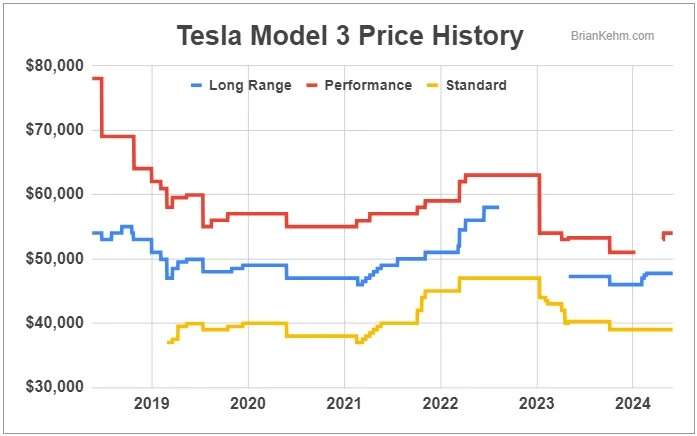
To see the larger images, here’s a deeper dive into the Model Y Price History. And a guide for the Model 3 Price History as well.
Since the launch of the Model Y and 3, the prices have jumped around. And today, you can get a lower cost Tesla than when it launched. On top of that, a new Tesla is a big improvement from past years. Tesla makes continuous hardware updates. If you’ve already bought one, you’ll also get over-the-air software updates.
The Model Y became the best-selling car in the world starting in 2023, and for good reason. The cost to buy one has come down. That’s a big plus, and the fuel and maintenance costs are lower than gas cars. Even better, buying a used Tesla can be more cost effective compared to many gas cars.
Over the years, Tesla has also offered a Referral Program. Click on that link to find updated referral codes. You might get a discount or other perks when buying a new Tesla.
To get an idea of the total Cost of Buying a New Tesla, that’s a useful article. Also, this video guide gives a good breakdown of what to consider. For example, some States charge extra fees for electric vehicles.
A big cost to owning a Tesla is also insurance. Here’s a full look a how much I’ve paid for Tesla Insurance. You’ll also find a list of different providers and how much they quoted. The comments on the video are useful as well. Other Tesla owners have shared how much they pay for insurance.
Depending on the time and state you’re buying in, the costs will vary. Feel free to reach out with any questions. If you comment on any of my videos, I should see a notification to respond.
Tesla Tips, Tricks & Hidden Features
Here are 28 Tesla Hidden Features and easter eggs. With this Tesla guide, here are some of the features you’ll learn:
- How to give remote driving access
- Gain access to ALL your Tesla cameras
- Rainbow road autopilot
- Setting five quick controls on your Tesla app
- Access Tesla service mode
You can also use Tesla Sentry Mode to keep your car safe. You can turn it on when your car is parked. I do this when I’m at coffee shops, grocery stores and other public areas.
Sentry mode won’t stop a determined criminal. However, it will record and save the video of what happened. This might help with tracking people down and insurance claims.
Here’s saved Sentry Mode video after a lady drew on my Tesla Model Y…
Also, all Teslas come with a Dashcam feature which is similar. You can save video from when you’re driving. If it’s set to auto, it should save video from safety-critical events. You can also set it up to save when you honk your horn. The video saves to a USB drive in the glovebox.
For another overlooked feature, there’s Car Wash Mode. If you just put your Tesla in neutral to roll through, there’s risk. The windshield wipers might activate, or the charge port might open. Turning on car wash mode prevents this and there’s a bit more to it. Check out that quick Tesla guide for more. You’ll find a video to see how it works.
This next Tesla tip can help you learn more about your specific Tesla. Where was it built? What kind of battery does it have?
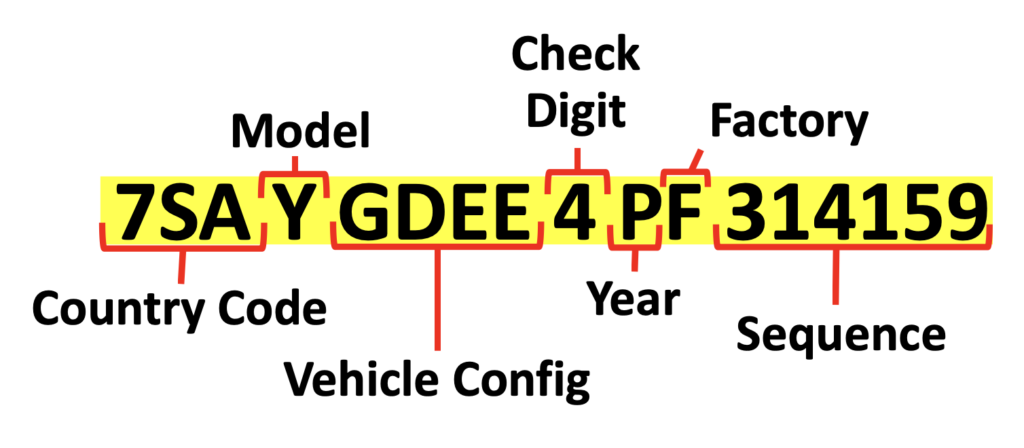
This info can be useful when buying a both a new or used Tesla. It can also help when buying accessories. Over the years, Tesla has changed build sizes and dimensions for the Model Y and other vehicles. Here’s the full Tesla VIN Guide.
For another Tesla feature, I’ve used Valet Mode a few times at hotels. This can give access to your car to others drivers. Turning this on provides some great safety features. It limits the driving speed and what valet drivers can access. They can’t see saved addresses and driving history.
Driving a Tesla
First Impressions
Switching from a gas car, there are some benefits to electric vehicles. Teslas have some unique design choices as well.
One of the first things most people notice are the door handles. They don’t stick out and are even with the body of the car. For the Model Y and Model 3, you have to push in the back part of the handle and then grab the other side to open.
Here’s more info for the First Time Driving a Tesla. And similar to many newer cars, your phone can be the key for unlocking it. The Tesla app makes it easy and there are backup keycards you can use as well.
To see some first impression, here are real Tesla drivers. I had two German friends drive my Model Y for the first time.
They both noticed the minimalism to the Tesla dashboard and many other differences.
For another first impressions video, here’s a fighter pilot driving a Tesla for the first time.
One of many things he noticed was visibility. When driving a Tesla, you don’t have a big back window to see behind you. This isn’t ideal. However, you can see the side and rear view cameras from the front screen. Once you get used to this, it’s actually an upgrade for driving. You don’t have to turn your head around. You can keep your gaze closer to the front, while having a better overall view.
Another benefit is that your Tesla is always on, and not spewing out toxic fumes. You don’t need to start an engine and this gives “instant torque.” Electric vehicles can accelerate faster than most sports cars. This can be handy when merging and in certain safety situations. You can also adjust the driving pedal sensitivity.
For first-time Tesla drivers, the one-pedal driving is the biggest difference. You don’t need to keep your foot on the break pedal to stay stopped. When you take your foot off the accelerator, your Tesla will slowly break for you. This also recaptures some energy.
When I go back to driving a gas car, I realize Tesla one-pedal driving is more efficient. For new drivers, it’s a little jarring at first. However, it’s easy to pick up and quickly becomes muscle memory.
Driving Tips
A Tesla is already one of the fastest cars on the road. This is one of a few reasons why I’ve set driving to Chill Mode. You can adjust set the default acceleration to smooth out your driving. This can save energy and slightly improve your range. Less aggressive drivers also reduce wear and tear on the cars.
For another tip, Tesla has solid built-in navigation that’s free. You can even share directions from your phone when using Apple or Google Maps. For faster charging, use Tesla navigation to Superchargers. This will start to preheat your battery for faster charging.
For this next one, hopefully you never need it. Although, I’ve had to do it a few times. Here’s How to Fix a Frozen Screen (Tesla video guide). If your Tesla screen is frozen, press and hold the two scroll buttons on the driving wheel. After a few seconds, it should go black and then you’ll see the Tesla logo appear. This starts the process to reset the screen.
I was able to do that while driving down the highway. It could also be a useful reset if your music or other Tesla apps have issues.
For another Tesla tip, keep in mind that the Model Y and 3 have low driving clearance. It’s good to be cautious if you’re driving on bad roads.
Driving in the Winter
Here are the Top Tesla Winter Tips. This guide has 21 tips and tricks. Here are just a few…
- What to do if Tesla Door Handles Freeze
- How to Preheat Your Tesla
- Tesla Window Winter Tip
- Do You Need Winter Tires?
- How Much Range Does a Tesla Lose?
I’ve driven my Model Y in freezing weather many times. That’s on icy highways, snowy mountain roads and forest service roads. I’ve even car camped when it got down to -15°F (-26°C). This next section is a bit more fun for adventurous travelers.
Tesla Camping
For camping, a Tesla has a big benefit over gas cars. You can keep the AC running without worrying about toxic fumes.
Here’s an ultimate guide for Camping in a Tesla. It’s a great way to adventure. You can keep costs low, while traveling anywhere anytime.
Here’s an overview video of the top reasons why I lived in my Tesla…
With the Tesla guides below, you’ll find even more in-depth videos. These cover a wide range of tips and tricks. This hands-on insight can help you better prepare for Tesla roadtrips and camping.
Tesla Camp Mode: This Tesla feature is nice to have. You can keep your car running with climate controls on all night.
For short trips and comfort, it’s a great option. Although, when living in my Tesla, I had a warm sleeping bag and blankets. If I wasn’t plugged in for the night, I’d usually leave it off. Then in the morning, I could turn the heat on from my phone before getting up.
Sleeping in a Tesla: I’m 6’3 (191 cm) and had plenty of room to sleep in the back. In a Model Y, the back seats fold down flat and there’s lots of storage. In this guide, you’ll see an inside look at my car camping setup.
There are many overlooked benefits and things to consider when sleeping in a Tesla. For example, when sleeping at night, I’d often hear noises outside. Instead of popping my head out, I could use the Tesla cameras to see around the car.
Stealth Camping: Most people don’t expect someone to be sleeping in a Tesla. This helped with stealth camping in towns and cities. No need to pay for a hotel.
I’d get in the driver’s seat and put up window covers. Then instead of opening the trunk and jumping in, I’d climb back from the driver’s seat. This helped with avoiding attention and prying eyes.
There’s also a key safety feature I missed the first month while living in my Model Y. If you don’t take certain steps, your Tesla won’t lock at night. Check out this stealth camping guide to learn more.
Tesla Camping Accessories
As mentioned, window covers are useful for car camping. That’s why they made the list – coming in at number three – of the top Camping Accessories.
For the number one spot, it’s a sleeping pad. With my experience from BoyScouts, a basic sleeping pad worked well. You’ll see the one I’ve been using and for even more comfort, there are custom Tesla Model Y Mattresses. These take up a bit more space and that’s not ideal when lived in a Tesla. However, for shorter camping trips, it’s a great accessory.
With that same logic, dedicated Tesla Camping Tents can be great for weekend trips. These can attach to a Tesla to give more room and protection from the elements.
Tesla Accessories
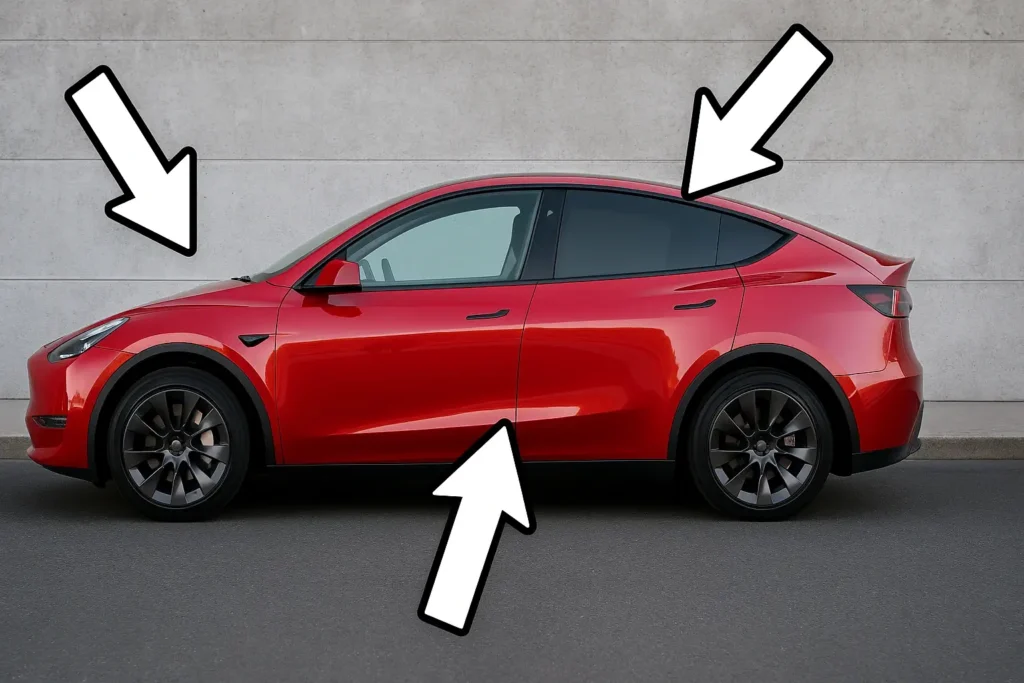
For a full list of 40 Tesla Accessories, check out that article. It includes both essentials and fun add-ons. It can help spark ideas to improve your Tesla setup.
For a shorter list of the most useful accessories, watch this video…
If you have any questions, feel free to reach out directly or comment on any videos. I’ve tested lots of Tesla products and I’m happy to share what I’ve learned.
For more in-depth guides, here are dedicated Tesla product reviews…
If you just bought a used or new Tesla, you might need to add a front license plate. Some states require it, others don’t. Here’s a quick guide on installing the front license plate holder. This is an accessory that should come with a new Tesla.
Tesla Charging
Electric cars have come a long way. Tesla has pushed the frontier. With a long range model Y/3, you can drive anywhere in the U.S today.
The built-in navigation makes it easy to travel and find superchargers. But on top of that, there are even more third party chargers coming online.
To make the most of your battery and charging, here are 15 Tesla Charging Tips. And just a few of the tips you’ll find…
- Precondition Battery for Faster Charging
- Boost Regenerative Breaking
- Charge Off Peak Hours to Save Money
When driving across the States, I also found lots of free Tesla slow chargers. This was at libraries, town halls, national parks, and many other places. The charging speed varied, but I wasn’t in a hurry most places.
For long road trips, driving a gas car is still the faster option. On a 10 hour day of driving, an electric car will add roughly an hour our two. But for most drivers, electric cars will save you time overall. This is a benefit many people overlook.
When charging at home, you’ll never have to go to a gas station to fill up. This saves five or 10 minutes here and there. And it adds up. When charging at homes, I’ve almost always used a standard 120 volt outlet (what you plug your phone into). It’s a slow charge, but overnight, it’s more than enough for daily commuting.
Here’s a question I didn’t think of before buying a Tesla. Is it Safe to Charge a Tesla in lightning? For the short answer, yes. It’s safe and feel free to open that article to learn more.
For one last charging tip, there’s an accessory that might come in handy. Tesla Superchargers lock so random people can’t unplug your car when charging. However, many third party chargers don’t have this feature.
Depending on where you charge, a Tesla charger lock might useful. If you’re only charging at home and Superchargers, no need. But if doing a lot of traveling, it could prevent someone from unplugging you. For example, overnight charging stations at a hotel.
Maintenance
Tesla vehicles require less maintenance than gas cars. Electric drivetrains have fewer moving parts. You don’t need to change the oil, replace spark plugs, or worry about transmission fluid. The regenerative braking also reduces wear on the brake pads. This leads to lower long-term maintenance costs (and saves time).
However, Teslas still need some attention and service. One of the first changes you might want are new Tesla Air Filters. Check out that Tesla video guide to learn from my experience.
Moving along to another area of maintenance…
Due to big batteries, Teslas are heavier than gas cars. As a result, the tires can wear down faster. Tesla recommends tire rotations every 6,250 miles. And owners get roughly 25,000 – 50,000 miles before needing a replacement.
With my non-aggressive driving, I made it to the higher end. I stopped by a Tesla Service Center and was surprised with what I learned…
If I didn’t have Tesla credits, I wouldn’t have gone to a Tesla Service Center. With the Model Y being the best-selling car in the world, more auto shops are providing Tesla services. You might find just as good of service that’s both closer and for a lower cost.
Some shops will provide paint protection film as well. However, I skipped this and have been happy with that decision. Here’s more insight on Tesla PPF.
Although, I did end up doing a DIY Tesla Paint Repair. That was after a lady hit my Model Y with her truck.
Battery and Software
Depending on the battery type, Tesla recommends keeping it charged between 20% and 80% for daily use. Only charge close to 100% for long trips. Also, avoid Superchargers for routine daily charging. This can help with long-term battery health.
There will be some degradation. But in many cases, the battery can last well over 300,000 miles. I even crossed paths with an early Tesla owner who pushed past 500,000 miles.
One common pushback I hear to buying an electric car is the expensive battery. However, by the time I might need one, they should be vastly improved. We’re seeing better energy density each year, along with lower costs.
Software updates are also a part of Tesla maintenance. The car receives over-the-air updates. These can improve performance, add features and fix bugs. It’s good to keep the software current and you can install updates overnight while plugged in.
Overall, Tesla ownership tends to be low-maintenance compared to ICE vehicles.
Tesla Problems
If you’re interested in buying a Tesla, it’s good to look at both the pros and cons.
Here are some Tesla Problems to consider. I’ve listed 13 issues and here are a few highlights (or lowlights)…
- Door handle issues
- Bad public perception (getting coal rolled)
- Software issues (frozen screen)
I’ve packed this Tesla guide with lots of useful info. Overall, I’ve been happy with my Model Y. And as mentioned, feel free to reach out with questions anytime.